

Market filings
Listed company disclosures across India, the US and New Zealand. Results, transcripts, investor presentations and regulatory filings.
MCP is the open standard AI assistants use to reach outside tools. Needl.ai runs a server on it, so one address gives your assistant your filings, the web and your own documents. Every answer carries the source it came from.
https://mcp.needl.ai/mcp
 ClaudeNeedl.ai connected
Using Needl.ai, what were the key takeaways from Orvane Industries' latest results?
Ask Needl
Three things stood out in the quarter:
Retail revenue grew 18% year on year, with store additions slowing.1
Q2 earnings releaseRefining margins came in below the prior quarter on weaker crack spreads.2
Earnings call transcriptTelecom ARPU was flat while subscriber additions held steady.3
Investor presentationWorks with the assistants your team already uses
Claude ChatGPT
 Cursor
Listed company disclosures across India, the US and New Zealand. Results, transcripts, investor presentations and regulatory filings.
News, regulatory commentary and sector coverage, searched live when a question needs it.
Documents, mail and chats already connected to your workspace, scoped to exactly what your account can open.
Real questions from analysts, deal teams and credit desks, answered without leaving the chat.
ClaudeNeedl.aiUsing Needl.ai, what were the key takeaways from Orvane Industries' latest results?
Ask Needl
Three things stood out in the quarter:
Retail revenue grew 18% year on year, with store additions slowing.
Q2 earnings releaseRefining margins came in below the prior quarter on weaker crack spreads.
Earnings call transcriptTelecom ARPU was flat while subscriber additions held steady.
Investor presentationClaudeNeedl.aiCompare the last four quarters of margin for these three names.
Ask Needl
| Company | Q1 | Q2 | Q3 | Q4 |
|---|---|---|---|---|
| Anvera Bank | 3.4% | 3.6% | 3.5% | 3.8% |
| Tessel Bank | 4.1% | 4.0% | 4.2% | 4.3% |
| Norrow Bank | 3.9% | 3.7% | 3.6% | 3.6% |
Pulled from each bank's quarterly filing. Every figure links back to the filing it came from.
ClaudeNeedl.aiCatch me up on the internal updates on the Kalden Ports deal.
Ask Needl
Three updates since your last check:
Revised term sheet circulated by the sponsor. New
Deal team mail thread, TuesdayDiligence checklist closed out on environmental items. Cleared
Shared drive, diligence trackerCredit committee memo drafted and awaiting review.
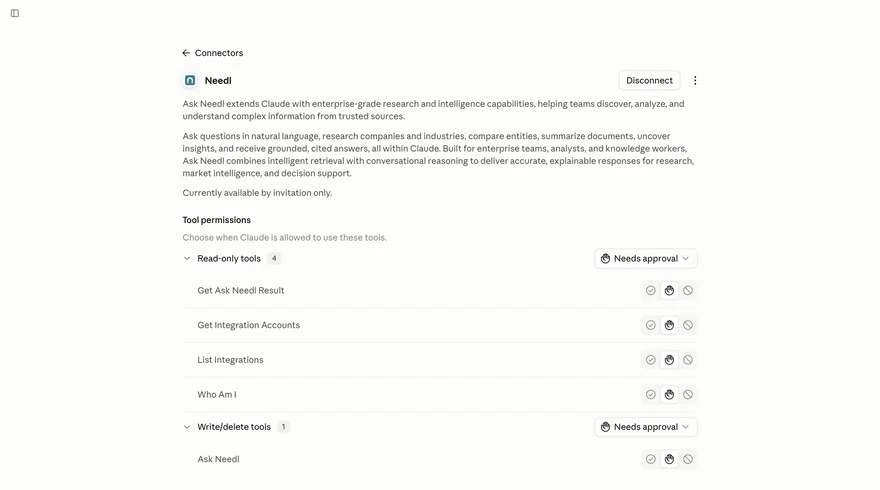
Internal documentNamed here exactly as they appear in your assistant's settings. You approve each one separately and can leave any of them off.
| Tool | What it does | Access |
|---|---|---|
Ask Needl | Runs a plain English question against your Needl.ai workspace and starts the retrieval. | Write |
Get Ask Needl Result | Returns the answer along with the documents it was drawn from. | Read |
List Integrations | Shows which source types are available to connect, such as drives, mail and feeds. | Read |
Get Integration Accounts | Shows the specific accounts you have linked under each integration. | Read |
Who Am I | Confirms which Needl.ai account the session is signed in as. | Read |
Ask Needl counts as a write tool because it creates a query record in your Needl.ai account. It does not change, move or delete any of your documents.
The connector opens the workspace you already have. Anything you cannot see in Needl.ai stays invisible to the assistant.
Results follow the same permissions as your Needl.ai login. Nothing widens because an assistant is asking.
OAuth 2.0, so no API keys go into a chat window. Disconnect it from your assistant at any time.
Your queries and documents do not train Needl.ai models.
Responses cite the documents they draw on, so you can check them against the original file.
Same address everywhere. Pick where you want it.
Works on every Claude plan. The Free plan allows one custom connector.
Needl.ai is listed in Claude's community connector directory, so there is nothing to paste. This is the quickest route for most people.
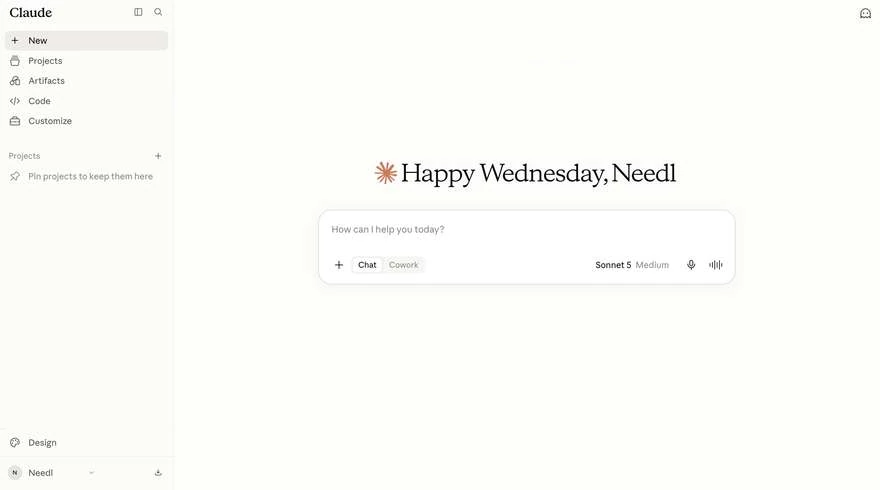
Customize sits in the left sidebar, below Code.
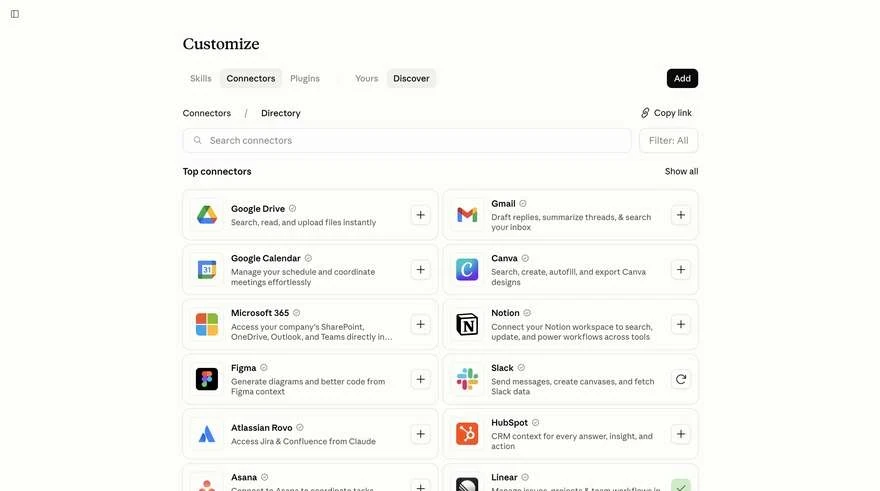
Switch to the Discover tab and type Needl into the search box. Click the plus button on the Needl.ai card.
Sign in with the account you already use at needl.ai, then choose when Claude may use each tool.
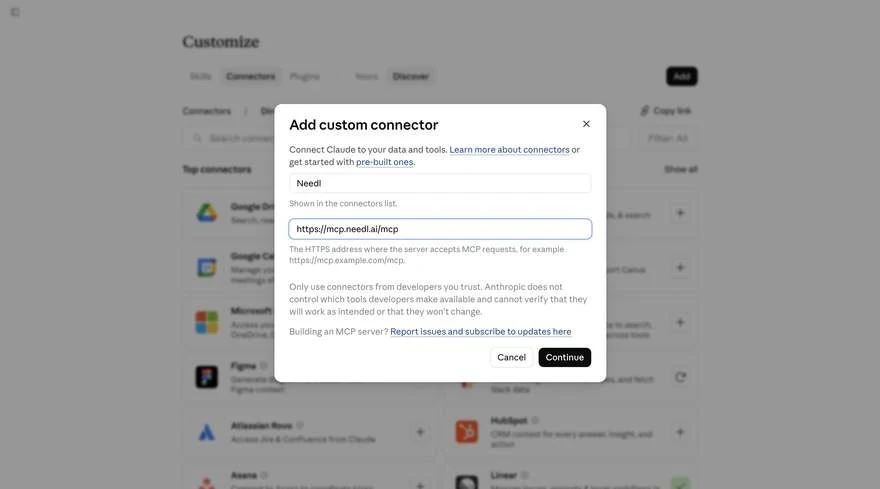
Use this if you would rather point Claude at the server address yourself, or if your workspace hides the directory.
The Add button is at the top right of the Connectors panel.
Call it Needl and paste https://mcp.needl.ai/mcp into the server URL field. The address has to end in /mcp. Then click Continue.
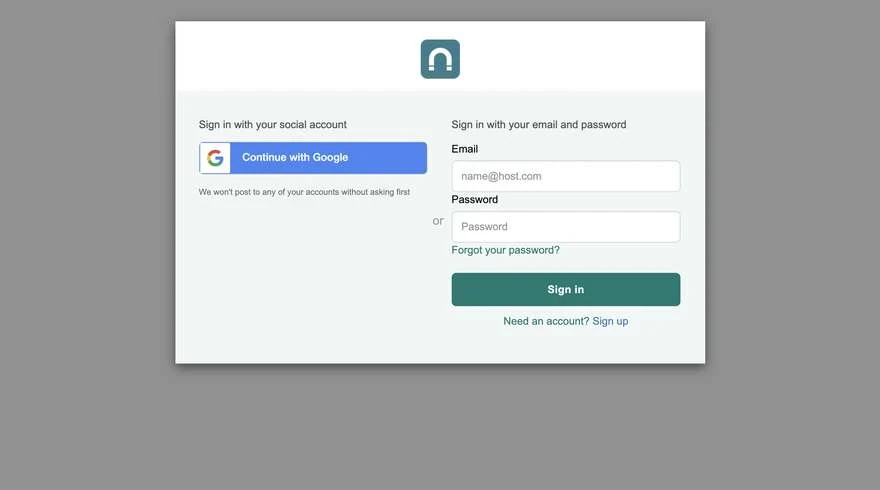
Sign in with the account you use at needl.ai, with Google or your work email and password. No account yet? If your organisation already uses Needl.ai, choose Sign up with your work email, then come back and connect.
Needl.ai shows a checkmark once connected. Open it to decide when Claude may use each tool, then start a new chat.
Needs ChatGPT Plus, Pro, Business, Enterprise or Education on the web, with developer mode turned on. On Business and Enterprise workspaces an admin allows it first.
Open Settings, then Security and login, and switch on Developer mode.
Go to Plugins, click the plus button and create a developer-mode app. Name it Needl, paste https://mcp.needl.ai/mcp, leave authentication as OAuth and accept the notice.
ChatGPT redirects to Needl.ai. Once you have signed in you land back on a confirmation, and Needl.ai appears among your apps.
In a new chat, choose Developer mode from the plus menu and select Needl.
One command. A browser window opens for sign-in the first time a Needl.ai tool runs, and after that you stay connected.
claude mcp add --transport http needl https://mcp.needl.ai/mcp
# check it registered
claude mcp list
# or run this inside a session for connection status
/mcp
Cursor and other MCP clients connect with the same address.
On Claude Team and Enterprise, and on ChatGPT Business and Enterprise, an owner adds the connector once for the organisation. Everyone then signs in with their own Needl.ai account and keeps their own permissions.
Go to Organization settings, then Connectors, and click Add. Choose Custom, then Web, and paste https://mcp.needl.ai/mcp. Give it a name the team will recognise, such as Needl.ai.
There is no Custom option for members on Enterprise. In any chat, click the plus button at the lower left, search for the connector by the name your admin gave it, and click Connect.
Each person signs in with their own Needl.ai account, then toggles the connector on. Results stay scoped to what that person can already see in Needl.ai.
Click the connector and hit Connect again. The usual cause is a sign-in window that was closed before it finished.
Refresh the page. If they are still missing, remove the connector and add it again.
The connection needs the public internet. On a VPN or behind a firewall, switch networks or ask IT to allow mcp.needl.ai.
The connector only reaches what your account reaches. Check the source is connected and indexed in your workspace, then ask again.
Needl.ai accounts belong to organisations, so sign in with your work email. If your organisation does not use Needl.ai yet, book a demo and we will set it up.
We will set it up on your sources and answer whatever your security team wants to ask.